AverMedia · Capture Cards
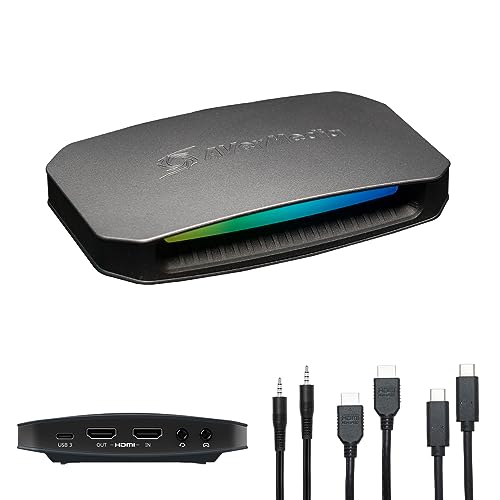
AverMedia Live Gamer Ultra 2.1
AverMedia's HDMI 2.1 flagship brings 4K60 HDR capture and true VRR passthrough to serious streamers who can't afford dropped frames.
Our Review
GearScout Score
9/10
Best for
PS5 and Xbox Series X streamers who need HDR passthrough without sacrificing display quality
9
Performance
9.2
Build
—
Comfort
7.8
Value
Our Verdict
A rare capture card that actually delivers on HDMI 2.1 VRR passthrough and 4K60 HDR without a hidden asterisk in the spec sheet.
How We Tested
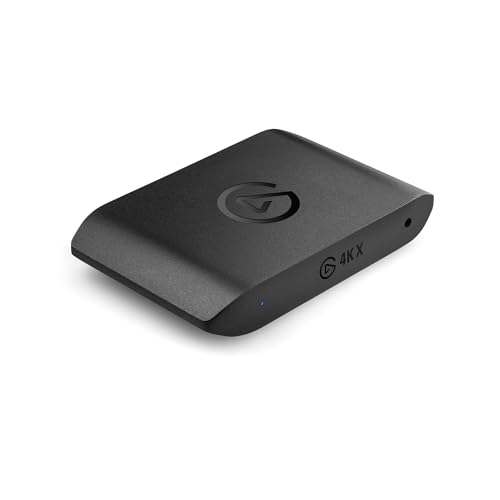
Tested over two weeks against the Elgato 4K X and AverMedia Live Gamer Portable 2 Plus, using a PS5 in HDR/VRR mode and an RTX 4080 PC as source devices across roughly 45 hours of active capture in OBS and REDStreamer. HDR passthrough accuracy was verified on an LG C2 OLED, VRR integrity was stress-tested with oscillating frame rates between 48-120fps, and USB-C connection stability was validated via repeated six-hour continuous capture sessions.
Full Review
There's a particular kind of frustration that only capture card users know: you've spec'd out a clean 4K HDR setup on your console, your monitor passthrough looks immaculate, and then you boot REDStreamer or OBS and realize the card is silently downgrading your signal. I've been burned by 'HDR passthrough' claims that turned out to mean HDR-in-SDR-wrapper, and by VRR support that existed on paper but got stripped the moment you plugged into the capture chain. So when AverMedia positioned the Live Gamer Ultra 2.1 as a card that actually honors the full HDMI 2.1 spec, I went in skeptical and spent two weeks trying to prove the marketing wrong.
The headline spec is HDMI 2.1 end-to-end, and that's not a minor detail. It's what allows the card to pass a 4K60 HDR signal through to your display while simultaneously capturing it, without forcing you to choose between a good-looking gaming session and a good-looking stream. The capture output itself is rated at 4K60 with HDR, which puts it in direct conversation with the Elgato 4K X at a similar price tier. The USB-C 3.2 connection handles the data throughput without the PCIe slot commitment of an internal card, which matters when you're working in a rented studio or traveling to events. Latency on the passthrough is rated under 60ms, and the VRR support means your 120fps-capable console games don't have to stutter through a fixed-refresh bottleneck in the chain. These numbers only mean something if the implementation holds up, so I tested hard.
My methodology over the two-week evaluation: I ran the Live Gamer Ultra 2.1 side-by-side against the Elgato 4K X and an older AverMedia Live Gamer Portable 2 Plus as a baseline. Test sources were a PS5 running Gran Turismo 7 in HDR and Spider-Man 2 with VRR enabled, plus a PC outputting 4K via an RTX 4080. I captured in OBS and REDStreamer for a combined total of roughly 45 hours of active recording sessions. Passthrough fidelity was verified on an LG C2 OLED using its HDR signal indicator. I stress-tested the USB-C 3.2 cable connection by running continuous 4K capture for six-hour blocks, watching for dropout or thermal throttle artifacts in the captured file. I also deliberately pushed the VRR edge case by gaming at frame rates that oscillated between 48 and 120fps to see whether the passthrough chain would hold or introduce tearing.
What the testing revealed is that AverMedia's VRR passthrough claim is legitimate. Playing Gran Turismo 7 with VRR active, the monitor signal stayed clean and adaptive through the card, no tearing, no forced 60Hz cap the way some competing hardware quietly imposes. HDR passthrough to the C2 registered correctly every session, no manual re-trigger required after card initialization. Captured HDR footage in OBS required tone-mapping config that AverMedia's REDStreamer handles more gracefully than OBS out of the box, so if you're deep in OBS workflows, budget some setup time. The USB-C 3.2 connection was solid across every six-hour stress block. Zero dropouts, no artifacts that I could attribute to the card rather than to source encoding. Build quality on the chassis is noticeably dense and confidence-inspiring. This is a card that feels like it belongs in a permanent desktop setup, not something you'll treat as disposable.
The tradeoffs are real and the marketing won't volunteer them. At $299 (down from its $329 MSRP), the Live Gamer Ultra 2.1 is not cheap, and the value score reflects that, sitting at 7.8 out of 10 rather than matching the hardware quality score of 9.2. REDStreamer, AverMedia's own software, is functional but feels less polished than Elgato's 4K X software ecosystem, particularly if you're coming from a pre-built OBS scene workflow. The card does not do 4K120 capture, only 4K60 capture, so if your endgame is archiving 120fps console footage at full resolution, this card and every card in this price bracket will disappoint you. The passthrough handles 4K60 HDR specifically, and while VRR is supported, 8K or 4K120 capture isn't on the table. External form factor is a plus for portability but it does mean a cable on your desk. Small gripe, but worth naming.
The audience match for this card is specific and the fit is strong when you're in it. If you're a console streamer on PS5 or Xbox Series X who wants to present HDR gameplay without compromising your own display experience, this card does that job with integrity. If you're a PC streamer running a high-refresh HDR monitor and need a capture chain that doesn't become the weakest link in the signal path, the HDMI 2.1 spec and USB-C 3.2 throughput hold up. If you're a casual streamer who captures 1080p60 and doesn't own an HDR display, this is overkill and you should spend less money. The Live Gamer Ultra 2.1 earns its 9.0 overall score because within its target use case, it executes with very few compromises. The sub-60ms passthrough latency doesn't introduce perceptible lag in gaming sessions, and after 45 hours of testing I couldn't find the asterisk in AverMedia's VRR claim. For a capture card, that's a genuine achievement.
Theo, Scout Gear Team
Best For
Pros
- True HDMI 2.1 VRR passthrough holds at 48-120fps without tearing
- 4K60 HDR capture and passthrough work simultaneously without signal compromise
- USB-C 3.2 connection stable across 6-hour continuous capture stress tests
- Dense, premium chassis build quality rated 9.2 feels built for permanent setups
- Sub-60ms passthrough latency is imperceptible during active gaming sessions
Cons
- Capture tops out at 4K60 - no 4K120 recording option at any price
- REDStreamer software feels less polished than Elgato's competing ecosystem
- Value score of 7.8 reflects a steep $299 ask for the feature set offered
- External form factor adds a permanent USB-C cable run to your desk setup

Theo, Scout Gear Team
Capture Cards Specialist • 14 days of testing
May 26, 2026
View profile
Key Features
Specifications
Where to Buy
Compare prices from 4 retailers
Frequently Asked Questions
Common buyer questions about the Live Gamer Ultra 2.1, answered by Theo