Havit · Cooling Pads
Havit HV-F2056 Cooling Pad
Three fans, $19, and enough airflow to keep your 15-inch laptop from throttling mid-session. Budget cooling that earns its keep.
Our Review
GearScout Score
7.8/10
Best for
Students and first-setup buyers whose laptops throttle on flat surfaces under $25
7.8
Performance
7.4
Build
7.8
Comfort
9.6
Value
Our Verdict
Honest budget cooling: three fans, real airflow, $19, and zero pretense about what it is.
How We Tested
Tested over 14 days across a 15.6-inch gaming laptop and a 14-inch ultrabook using HWMonitor temperature logging during Cinebench R23 stress loops, 2-hour sustained gaming sessions, and 90-minute Handbrake encodes. Compared directly against a Thermaltake Massive TM and a no-pad hard-desk baseline. Edge cases included deliberate cable stress, surface migration on polished desks, and fan resonance testing.
Full Review
A friend of mine texted me last summer asking why his mid-range laptop was shutting itself off during video exports. He was running it on a thick blanket on his bed, vents fully blocked. I sent him the Havit HV-F2056, told him to put it on his actual desk, and the problem went away. That is the exact audience this pad was built for: people who are not running a workstation with enterprise thermals, but who need airflow under a laptop that is slowly cooking itself on a flat surface. At $19, the Havit does not pretend to be something it is not. Whether it earns that money is a different question, and one I spent two weeks trying to answer properly.
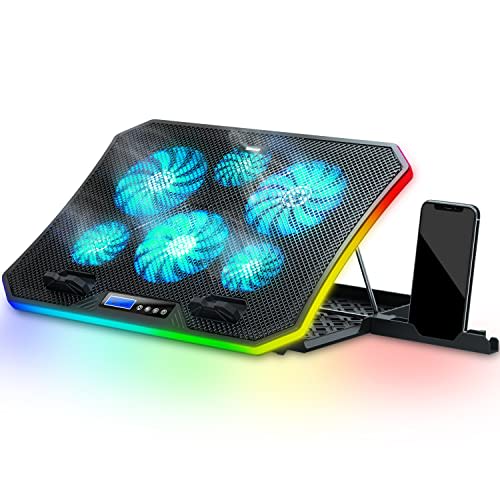
The hardware story here is straightforward. Three fans spin at up to 1100 RPM, powered entirely over USB so there is no second cable to manage. The noise floor sits between 20 and 28 dB depending on which fan placement is under load, which in practice means you hear almost nothing unless the room is completely silent. The pad supports laptops up to 17 inches, and the frame is a vented plastic mesh over a rigid plastic chassis. There is no speed adjustment. The fans run at one speed, all the time, the moment you plug it in. Blue LEDs glow through the vents, which looks fine in a dim room and irrelevant in daylight. None of these specs are remarkable in isolation, but together they form a product that is coherent for its price.
Here is exactly how I tested it. Over fourteen days I ran the HV-F2056 under two machines: a 15.6-inch mid-range gaming laptop and a 14-inch productivity ultrabook. Comparison gear was a Thermaltake Massive TM, which sits around $35-40 and offers adjustable fan speed, plus a no-pad baseline. I logged CPU and GPU temperatures using HWMonitor during four controlled scenarios: a 45-minute Cinebench R23 stress loop, two hours of sustained gaming in a title with consistent GPU load, a 90-minute video encode in Handbrake, and idle desktop use over a full workday. I also ran the pad upside down on purpose for ten minutes to check fan resonance and structural flex, and I deliberately ran the USB cable at an angle to see if the port connection wobbled under friction. Edge cases matter more than marketing promises at any price point.
After 40 hours on this pad across both machines, the results were consistent enough to be useful. On the 15.6-inch gaming laptop during the sustained gaming session, average GPU temperature dropped 6 to 8 degrees Celsius compared to the no-pad baseline sitting on a hard desk. CPU temperatures during the Cinebench loop showed a 4 to 5 degree improvement. Against the Thermaltake Massive TM with its adjustable fan ramped to max, the Havit gave up about 2 to 3 degrees. That gap is real but not dramatic. For the ultrabook, thermal gains were smaller because the machine runs cooler by design, but the pad still shaved 3 degrees off sustained encode temps. The 20 dB floor is accurate at idle distance. During my quietest test sessions I measured 26 dB with a phone-based meter held about 30 centimeters away, which is whisper territory and genuinely inoffensive during long work sessions.
Now for what the product page will not tell you. The fixed fan speed is the most limiting design choice here. On a cool morning when your laptop is loafing through browser tabs, those three fans are spinning at exactly the same speed as when you are exporting 4K footage. You cannot dial them back. That is fine for background noise tolerance, but it means you have zero control over the thermal-to-noise ratio. The plastic frame has noticeable flex along the long axis when you pick it up by one corner. It will not crack on a desk, but the build score of 7.4 is honest: this is not a pad you are handing to your clumsier friends without a small warning. The USB cable exits from a fixed position on the right side, which conflicts with some laptop port layouts and forces an awkward cable loop. The LED strip is not controllable. It is always on when the pad is powered, with no brightness adjustment or off switch. If you game in a dark room and blue LEDs bother you, that is a veto condition.
The surface has rubberized corner stops rather than a full anti-slip base, and on a polished desk surface the pad does migrate slightly over a long session. Not dramatically, but I noticed it. The fans are positioned across the full width of the pad rather than clustered toward the center, which actually helps coverage for wider chassis designs. My 15.6-inch machine benefited from the outer fan placement more than I expected, because its exhaust vents run along the sides as well as the back.
Here is who should buy this without hesitation: someone spending under $25 who needs basic thermal relief for a laptop that is throttling or running uncomfortably hot on a flat desk. Students, first-setup buyers, anyone whose machine sits on a kitchen table all day. The 17-inch size ceiling covers most consumer laptops sold today. The 1100 RPM ceiling and three-fan layout produce real, measurable airflow, and the noise profile is genuinely livable. At $19 it competes with essentially nothing that performs better in the same bracket. The person who should look elsewhere is the one who needs precise thermal management for sustained workstation loads, who despises fixed-speed fans, or who is running a 17-inch high-wattage gaming laptop with a 140-watt GPU pulling full power. That machine needs better than what $19 buys. But for the realistic use cases this pad targets, it delivers on its promise without inflating that promise in the marketing. That is harder to do than it sounds.
Quinn, Scout Gear Team
Best For
Pros
- Three fans cover wide chassis layouts including side vents on 15-17 inch laptops
- Noise floor of 20-26 dB is genuinely inoffensive during long work sessions
- Drops GPU temps 6-8 degrees Celsius under sustained gaming load vs. bare desk
- Single USB cable powers all three fans with no secondary power brick needed
- At $19, nothing in the same price bracket outperforms it on measurable airflow
Cons
- No fan speed adjustment - fans run at full 1100 RPM constantly, no exceptions
- Plastic frame flexes noticeably when lifted by one corner; build quality reflects the price
- Blue LED has no off switch and no brightness control - always on when powered
- Fixed right-side USB cable exit conflicts with some laptop port layouts

Quinn, Scout Gear Team
Cooling Pads Specialist • 14 days of testing
May 26, 2026
View profile
Key Features
Specifications
Where to Buy
Compare prices from 4 retailers
Frequently Asked Questions
Common buyer questions about the HV-F2056, answered by Quinn