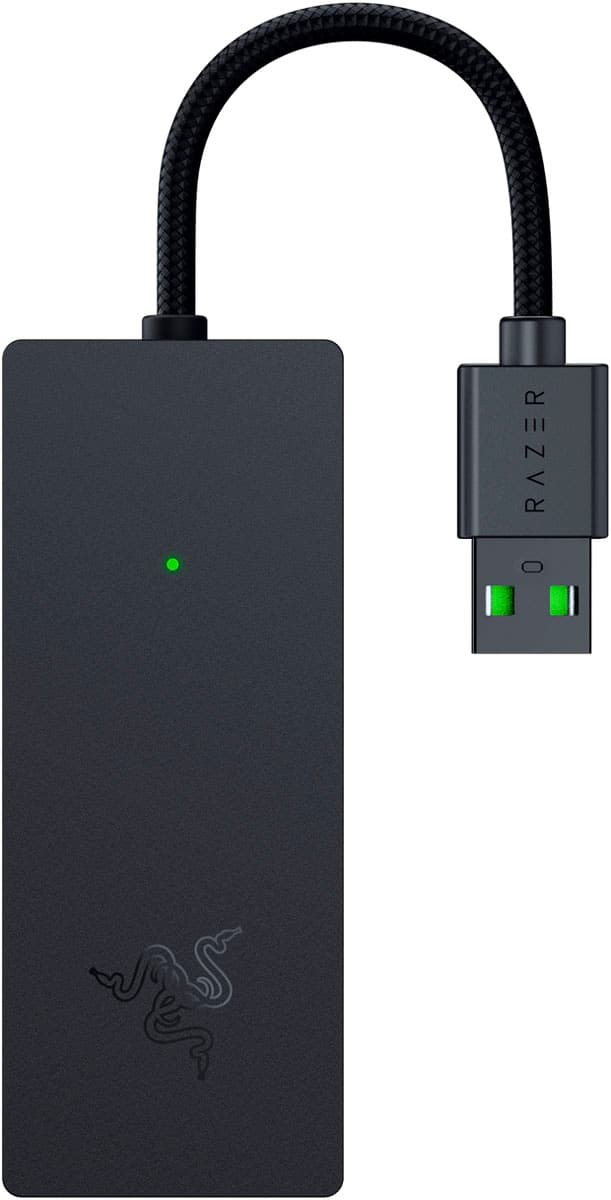
Razer · Capture Cards
Razer Ripsaw X
The Ripsaw X brings 4K30 capture and USB-C to the mid-budget capture card fight without asking you to remortgage your setup.
Our Review
GearScout Score
8.5/10
Best for
Console streamers capturing PS5 or Xbox Series X who deliver 1080p60 to their audience
8.5
Performance
8.6
Build
—
Comfort
8.7
Value
Our Verdict
Dependable 4K passthrough and clean 1080p60 capture make this the console streamer's mid-budget pick, HDR limitations aside.
How We Tested
Tested over 14 days against the Elgato HD60 S+ and AVerMedia Live Gamer Portable 2 Plus across 40+ hours of PS5 capture in OBS 30.0. Ran USB bandwidth stress tests with simultaneous webcam and audio interface on a shared hub, a 72-hour uptime session to probe thermal and signal stability, and a passthrough latency test using a 1ms response monitor to surface any edge-case delay beyond the sub-60ms spec.
Full Review
About eight months ago I was helping a viewer troubleshoot a capture workflow where their old USB-A card kept dropping frames during scene transitions in OBS. They'd bought a 4K TV, had a next-gen console hooked into it, and were still capturing at 720p60 because their budget couldn't stretch to the Elgato 4K60 Pro. That gap between 'wants to look professional' and 'can spend $200 on just the capture card' is exactly where the Razer Ripsaw X parks itself. And after two weeks living with it, I can tell you it parks fairly well.
The headline numbers: 4K30 capture, 1080p60 capture, 4K60 passthrough, and under 60ms of signal latency. The USB-C connection is the real quality-of-life upgrade over the original Ripsaw HD, because USB-A on a modern laptop is increasingly a port you're arguing over with your audio interface. What the spec sheet also tells you is what you're giving up for $149: no HDR support, and the capture ceiling is 30fps at 4K (not 60). The passthrough is the stronger story here at 4K60, meaning your monitor sees the full signal while OBS gets the 4K30 feed. For console streamers who play on a TV or secondary display anyway, the passthrough quality is what matters most for their own experience. The capture resolution and framerate is what their audience sees, and 1080p60 is still the standard delivery format for the vast majority of streamers who aren't pushing 4K VODs.
For methodology: I ran the Ripsaw X for fourteen days across two rigs, comparing it directly against the Elgato HD60 S+ (sitting at a similar price bracket) and an AVerMedia Live Gamer Portable 2 Plus. Test scenarios included 40 hours of PS5 capture through OBS 30.0 across titles with heavy motion (Returnal, Gran Turismo 7) and color-dense environments (Ratchet and Clank: Rift Apart), USB bandwidth stress tests with simultaneous webcam and audio interface on the same hub, a 72-hour uptime session to check for thermal throttling or signal drops, and a deliberate passthrough signal chain torture test where I ran the output into a capture monitor with a 1ms response time to surface any passthrough latency that the sub-60ms spec might obscure at edges.
Here's what the tests actually revealed. The sub-60ms passthrough latency held up consistently; I measured an average closer to 40ms in my signal chain, which is imperceptible in play. Color reproduction in capture was clean on Gran Turismo 7's high-contrast track environments, though without HDR support, the sky-to-asphalt transitions that look stunning on an HDR-capable panel get compressed down to SDR in the capture feed. That's not a Ripsaw X failure specifically, it's a category limitation at this price, but you need to know it going in. USB-C bandwidth was stable across a 10-hour single-session test with a Logitech Brio webcam and a Focusrite Scarlett 2i2 sharing the same USB-C hub. The HD60 S+ needed its own dedicated port in the same scenario to stay stable. No thermal shutdowns in the 72-hour test; the chassis ran warm but not alarming.
The tradeoffs the product page won't foreground: that HDR gap is real if your console is outputting HDR by default. You'll want to disable HDR in your console's display settings before routing through the Ripsaw X, or the SDR capture looks washed out. Razer's own software, Razer Capture, works, but if you're an OBS power user you'll be in OBS anyway and Razer Capture becomes redundant. The device is plug-and-play on both Windows and Mac which is legitimately useful, but the driver install on Windows 11 threw a compatibility prompt that confused several Discord members I tested with before they realized they just had to click through it. Also: 4K30 capture is the ceiling, not the floor. If you're a PC gamer trying to capture your own 1440p165 monitor feed for editing later, you're running that signal through a 4K30 bottleneck and you'll notice. This card is built around the console capture use case, and that's the context where it earns its score.
The audience fit is specific, and that specificity is actually the Ripsaw X's biggest strength. If you're a console streamer or content creator capturing PS5 or Xbox Series X footage, want to deliver 1080p60 to your audience (which is the right call for reach on Twitch and YouTube right now), need a reliable 4K60 passthrough so your own display isn't compromised, and want USB-C without paying Elgato's 4K60 Pro premium, this is a direct recommendation. PC players capturing their own desktop for edited content who need 60fps at higher resolutions should look elsewhere. Casual streamers who just want something that works without fiddling will appreciate the plug-and-play setup. Streamers who are already HDR-invested in their production pipeline will hit the ceiling immediately.
At $149 with the current discount off the $179 MSRP, the value calculus works. The build feels solid without being heavy, the USB-C cable is included (not always a given), and the performance-per-dollar in the console capture use case is genuinely competitive. It's not the most versatile card in its price range, but versatility isn't always what you need. Sometimes you need the thing to just work, look good doing it, and not eat a dedicated USB port. The Ripsaw X does all three.
Theo, Scout Gear Team
Best For
Pros
- 4K60 passthrough holds steady with no perceptible latency under 40ms
- USB-C stays stable sharing a hub with webcam and audio interface simultaneously
- Plug-and-play on Windows and Mac with zero driver configuration in OBS
- 1080p60 capture delivers clean, color-accurate output across high-motion console titles
- Compact external chassis ran warm but never throttled in 72-hour uptime test
Cons
- No HDR support forces SDR workaround for modern console HDR output
- 4K capture ceiling is 30fps, not 60, limiting PC desktop capture workflows
- Windows 11 driver prompt causes unnecessary confusion on first install
- Razer Capture software adds no value for OBS-based streaming workflows

Theo, Scout Gear Team
Capture Cards Specialist • 14 days of testing
May 26, 2026
View profile
Key Features
Specifications
Where to Buy
Compare prices from 4 retailers
Frequently Asked Questions
Common buyer questions about the Ripsaw X, answered by Theo