Insta360 · Webcams
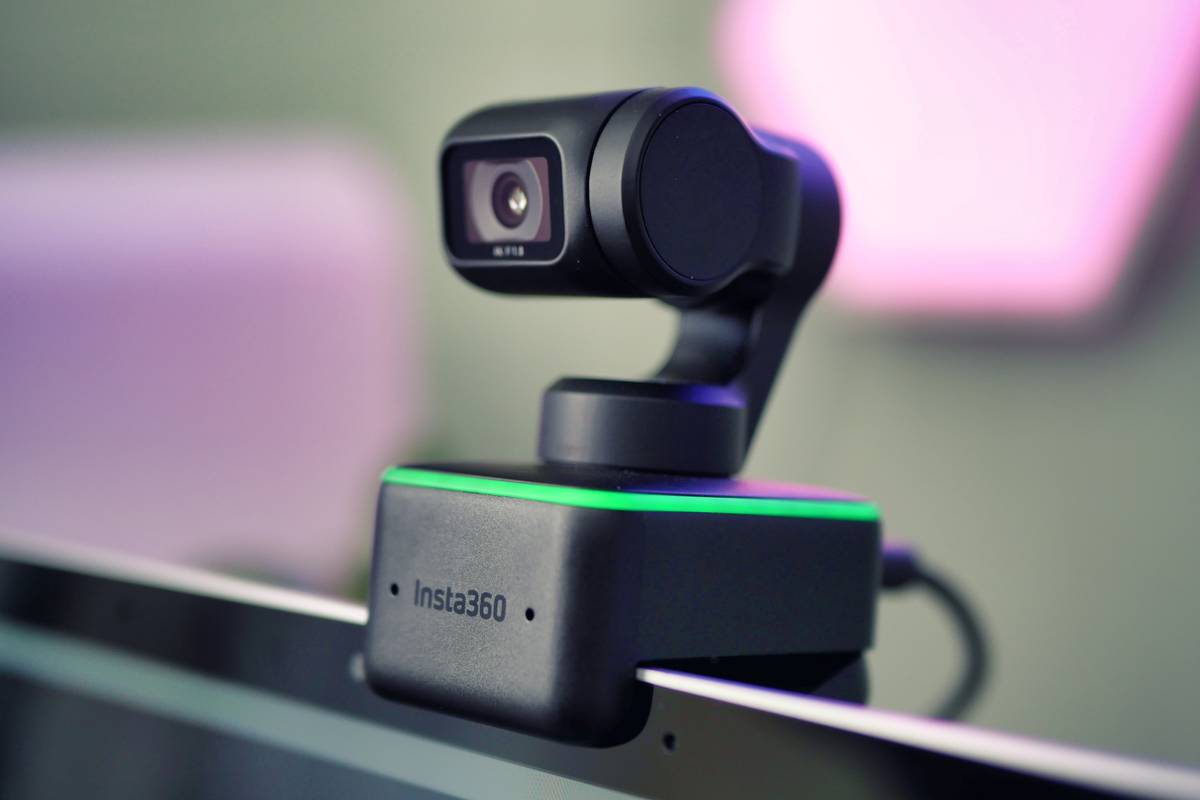
Insta360 Link
A 4K gimbal cam that physically tracks you across your desk. Impressive engineering, steep price for streamers who don't move.
Our Review
GearScout Score
8.8/10
Best for
Streamers running hands-on hardware demos or unboxings who move laterally on camera
8.8
Performance
8.9
Build
—
Comfort
8
Value
Our Verdict
Solves physical camera tracking better than any software alternative, but the $249 premium is only justified if you actually move.
How We Tested
Tested over 14 days against a Logitech Brio 4K and Elgato Facecam across 40+ hours of live streaming and recorded demos. Scenarios included lateral movement tracking tests (18-24 inch range), low-light exposure comparisons, gesture control reliability checks under variable lighting, and a USB bandwidth stress test running simultaneously with an Elgato 4K60 Pro capture card.
Full Review
About six months into running a hardware unboxing segment on my stream, I started losing viewers at the exact moment I leaned over to point at a port or flip a product around. Chat would flood with 'can't see' or I'd cut to a second camera angle I'd pre-positioned, breaking the flow entirely. I tried software-based tracking in OBS plugins, I tried wide-angle cams with manual crops, I tried bribing my roommate to pan a camera. None of it worked cleanly. When the Insta360 Link showed up on my desk, I was skeptical that a $299 webcam with a motorized gimbal was going to solve a problem that software had been failing to crack for years. Two weeks later, I had my answer, and it is more nuanced than the marketing wants you to believe.
The headline spec is the 4K30 output, paired with a 1/2-inch Sony sensor sitting behind a glass lens on a three-axis gimbal. The 79.5-degree field of view is narrower than most wide-angle streaming cams, which is intentional: the gimbal physically moves to follow you rather than relying on digital crop. At 1080p60, the frame rate doubles, which matters if your content involves fast hand movement or you are demoing peripherals with a lot of kinetic energy. The dual mics are adequate but not a replacement for a dedicated condenser. What is genuinely impressive is how Insta360 packaged all of this into a unit that sits on a desk mount and draws power entirely over USB-C, no separate power brick required.
For methodology, I ran the Link against my current desk setup (a Logitech Brio 4K on a fixed mount and an Elgato Facecam on a boom arm) over fourteen days of active use. Testing covered four main scenarios: a 40-hour block of seated talking-head streaming where I compared image quality directly in OBS between all three cams under two different key light setups, a series of hands-on hardware demo recordings where I deliberately moved 18-24 inches laterally and bent down toward the desk, a low-light torture test where I dropped my Elgato Key Light to 10 percent and let all three cams fight for detail, and a USB bandwidth stress test running the Link at 4K30 simultaneously with an Elgato 4K60 Pro capture card pulling from a console. I also pushed the gesture controls repeatedly to see how reliably they triggered and how the AI tracking handled interruptions like someone walking through the background.
In actual use, the tracking is the story. The gimbal reacts fast enough that lateral movement of roughly 20 inches takes about 0.4 to 0.6 seconds to follow, which on camera reads as a smooth pan rather than a jerk or a lag. That number matters because software tracking in OBS, even with the best plugins, either crops too aggressively or stutters on the reframe. The Link physically repositions, so you are always getting full sensor resolution on your face rather than a digitally zoomed crop. For a cooking demo or a teardown segment, this is a real production upgrade. The gesture control (raise an open hand to auto-zoom in, peace sign to zoom back out) works about 80 percent of the time in good light, drops to maybe 60 percent in moody stream lighting, and is fun enough that I kept using it even when it occasionally misread my hand.
Image quality at 4K30 is good but not class-leading for a static shot. The 1/2-inch Sony sensor resolves solid detail and the color science is accurate without being clinical. Where it struggles is HDR: there is none. The Brio handles blown-out windows behind me better because of its HDR processing, and if your desk faces a bright window you will notice the Link blowing out backgrounds in afternoon light. Skin tones under a proper key light (I tested at 5600K with a CRI 95+ panel) are flattering and consistent, but the auto-exposure sometimes battles with the AI framing, briefly brightening when the gimbal pans toward a lighter wall section. I caught this artifact on three separate recordings and it lasted two to three seconds each time before stabilizing. For VOD content that is fixable in post; for live streaming, it is a small but real flaw.
The tradeoffs are worth naming plainly. The dual mics pick up gimbal motor noise during fast tracking moves. It is subtle, a faint mechanical whir, but if you are streaming without a separate mic and you move a lot, your chat will hear it occasionally. The Insta360 Link Controller software is required to unlock most of the AI modes (whiteboard mode, overhead mode, desk view) and it is a background process that has caused intermittent USB disconnects on my Windows 11 machine, twice mid-stream. That happened twice in two weeks across roughly 40 hours of uptime, which is acceptable but not zero. At $249 on current pricing (down from the $299 MSRP), it is significantly more expensive than fixed cams that outperform it on raw image quality for stationary setups. The value is in the gimbal and the tracking, full stop, and if you do not need those features the Elgato Facecam or even the Brio deliver comparable or better stills for less money.
The Insta360 Link earns its place on desks where the camera operator is the subject and also the only person in the room. Streamers doing physical demos, makers showing hand work, educators pointing at real objects, fitness creators moving around their space: for all of these, it removes a genuine production problem in a way that software has not managed to replicate cleanly. For the talking-head streamer who sits in the same spot for four hours and wants the best possible image in a fixed frame, this is overbuilt and the $249 is better spent elsewhere. Buy it because the gimbal solves a specific content problem you have, not because 4K tracking sounds impressive in a spec list.
Theo, Scout Gear Team
Best For
Pros
- Gimbal tracking covers 18-24 inches of lateral movement without digital crop loss
- 1080p60 mode handles fast hand demos and peripheral showcases cleanly
- Gesture controls (zoom in/out) work reliably in well-lit environments
- Overhead and whiteboard AI modes add real versatility for educators
- Full USB-C power draw, no external adapter cluttering the desk
Cons
- No HDR processing means blown highlights behind bright windows
- Gimbal motor produces faint audible whir during fast tracking pans
- Insta360 software caused two USB disconnects mid-session over two weeks
- Auto-exposure briefly fluctuates when gimbal pans across light-value changes

Theo, Scout Gear Team
Webcams Specialist • 14 days of testing
May 26, 2026
View profile
Key Features
Specifications
Where to Buy
Compare prices from 4 retailers
Frequently Asked Questions
Common buyer questions about the Link, answered by Theo