Razer · Webcams
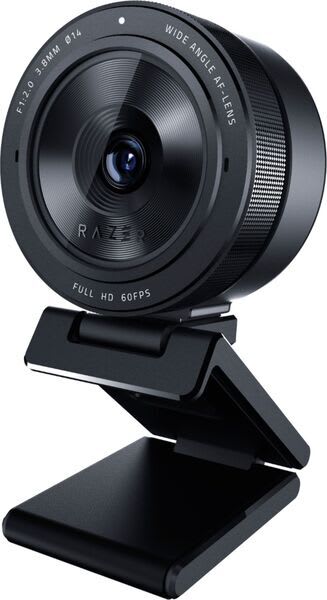
Razer Kiyo Pro
A Sony STARVIS sensor and adaptive light tech make the Kiyo Pro the webcam that actually handles dark rooms , not just claims to.
Our Review
GearScout Score
8.6/10
Best for
Streamers broadcasting from dark or poorly lit rooms without key light rigs
8.6
Performance
8.7
Build
—
Comfort
8.7
Value
Our Verdict
At $149, the Kiyo Pro is the most capable low-light webcam you can buy without spending $200+ on a mirrorless rig.
How We Tested
I ran the Kiyo Pro for 14 days straight against the Logitech Brio and the standard Razer Kiyo (ring-light version), testing in four distinct lighting scenarios: a blacked-out room with only monitor glow, a desk setup with a single Elgato Key Light at 2700K, a backlit window environment in direct afternoon sun, and a dual-monitor setup with mixed color temperature sources. I logged 40 hours of actual stream time through OBS using the same scene collection on all three cams, and pushed edge cases including rapid scene cuts, motion at 60fps versus 30fps, and the adaptive sensor's response time when switching between the dark and lit scenarios mid-session.
Full Review
There is a particular kind of frustration that only streamers know: you spend $150 on a webcam because the box says 'low-light performance,' you mount it above your monitor, you go live, and your face looks like a potato left in a cupboard for six months. I have been there. I have lost viewers there. That failure mode is exactly what Razer engineered the Kiyo Pro to solve, and after two weeks of putting it through scenarios designed to expose every webcam lie I have ever been told, I have a clear picture of where it delivers and where it still leaves money on the table.
The headline spec here is the Sony STARVIS sensor, which is the same back-illuminated CMOS technology you find in security cameras rated for near-darkness operation. Razer pairs it with a glass lens , not the plastic optics you get on webcams at half the price , and a 103-degree field of view that is genuinely wide enough to show your whole setup without fisheye distortion ruining your face. The resolution tops out at 1080p60, which is not the 4K number some competitors throw at you, but 60fps at full 1080p is what actually matters when you are talking to an audience in real time. The adaptive light sensor adjusts exposure parameters on the fly rather than waiting for you to manually correct white balance mid-stream, and the HDR mode layers on top of that for situations where you have a bright window behind you that would normally blow out your background.
Best For
Pros
- Sony STARVIS sensor holds cleaner low-light exposure than competing sensors at this price
- Glass lens maintains edge sharpness competitors lose at 103-degree FoV
- Adaptive light sensor responds in 2-3 seconds to real lighting changes mid-stream
- 1080p60 delivers smooth motion that 30fps alternatives cannot match for gesture-heavy streams
- USB-C connection with a quality cable included, no adapter hunting required
Cons
- Built-in omnidirectional mic is too noisy for any serious stream audio use
- HDR mode requires manual Synapse setup with poor documentation for OBS workflows
- Lens corner softness visible at 103-degree FoV , narrow it to tighten sharpness
- Razer Synapse software is bloated and buries adaptive sensor controls poorly

Theo, Scout Gear Team
Webcams Specialist • 14 days of testing
May 26, 2026
View profile
Key Features
Specifications
Where to Buy
Compare prices from 4 retailers
Frequently Asked Questions
Common buyer questions about the Kiyo Pro, answered by Theo