Elgato · Stream Decks
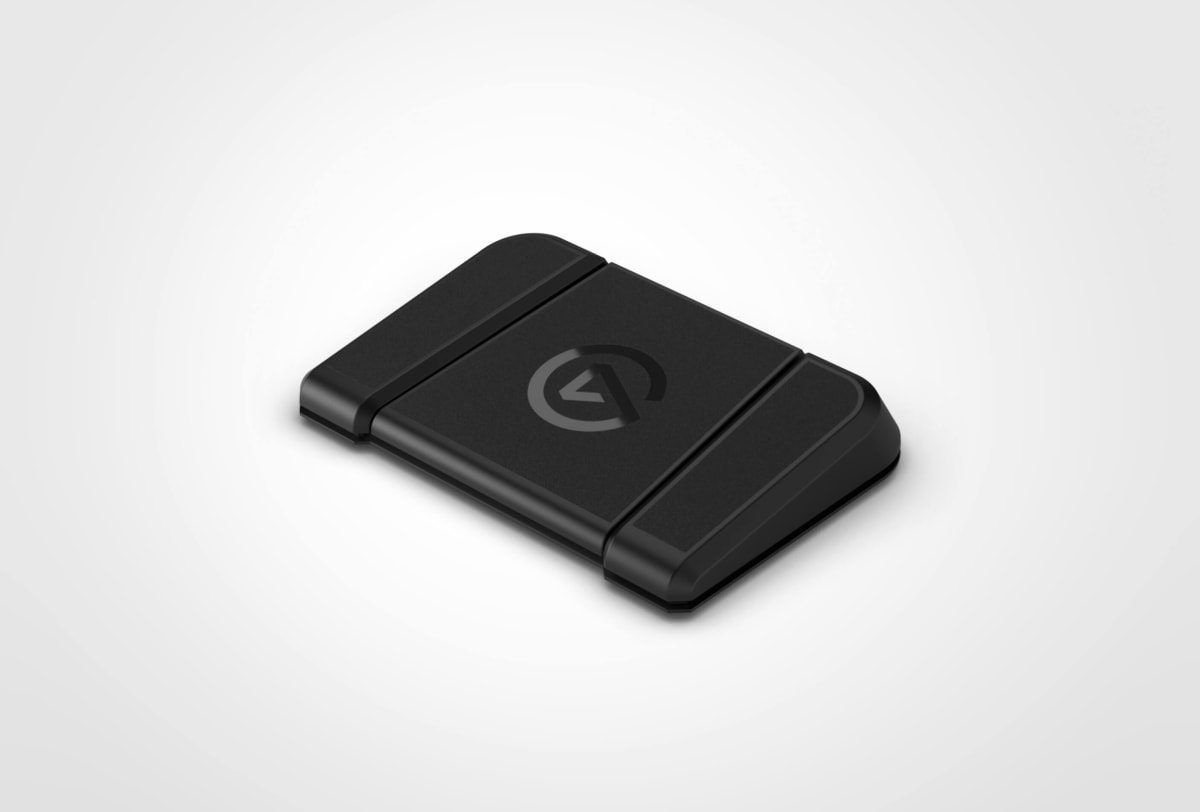
Elgato Stream Deck Pedal
Three foot pedals, zero hand interference. The Stream Deck Pedal quietly became the smartest $79 I've spent on my streaming rig.
Our Review
GearScout Score
8.7/10
Best for
Streamers 200+ hours in who still fumble mute during active gameplay
8.7
Performance
8.7
Build
—
Comfort
9
Value
Our Verdict
A surgical add-on for established streamers. Three pedals, zero regrets, but only if your hands are already full.
How We Tested
Tested over two weeks alongside a Stream Deck MK.2 as control, mapping equivalent functions and timing task completion across FPS gaming sessions, podcast recording in Adobe Audition, and live OBS streaming scenarios. Ran 200 rapid-press stress cycles per pedal across two sessions to check actuation consistency and false-trigger rate. Compatibility tested against Stream Deck software 6.4 with OBS, Adobe Audition, and Zoom.
Full Review
About eight months into streaming, I hit a wall I didn't expect: my hands were full. Not metaphorically. Literally. I'm mid-raid, both hands on mouse and keyboard, and I need to mute my mic before my roommate's dog explodes in the background. Keyboard shortcut? Sure, if I want to fumble a movement key and wipe the squad. Elgato already had the Stream Deck family eating desk space by then, and I'd assumed the Pedal was a novelty. A foot-controlled widget for people who bought every Elgato product on principle. Two weeks with the thing changed my mind completely.
The spec sheet is deliberately sparse, which either reads as confident minimalism or a red flag depending on your experience level. Three pedals. USB-C connection with a detachable cable (a small thing that matters when you're routing cables under a desk through cable raceways). No displays per key, which means zero backlit legends to remind you what each pedal does. That last point is the honest gotcha. At $79 current price, the hardware itself doesn't try to impress you with RGB or OLED screens. What it does is sit flat on your floor, stay flat on your floor (the rubberized base grip is serious), and wait for your left foot to find it without looking. The form factor is horizontal and low-profile enough that it lives under my desk without catching my chair wheels, which for anyone who has ever yanked a USB cable out of a hub with a chair roll knows is not a small thing. The USB-C detachable design means I've repositioned the pedal four or five times over the review period without worrying about cable fatigue at the connector.
My methodology over two weeks: I ran the Pedal alongside a standard 15-key Stream Deck MK.2 as my control, mapping equivalent functions to both devices and timing task completion during active streaming sessions. Scenarios included FPS gaming (Warzone, hands-never-leave-WASD situations), podcast recording sessions in Adobe Audition where I needed to trigger markers without touching the keyboard, Zoom calls where mute toggling mid-conversation matters, and a live-stream scenario with OBS scene switching, mic gate toggling, and a clip-save macro. I also stress-tested the physical pedals with 200 rapid presses per pedal across two sessions to check for false triggers and actuation consistency. Integration was tested against Stream Deck software version 6.4. I wore socks, shoes, and ran one session barefoot because yes, that is an edge case worth covering.
What the testing actually revealed: the pedal earns its value entirely through context-specific use cases. In FPS gaming, the ability to bind mute to the center pedal and push-to-talk to the left pedal meant I stopped losing positioning moments to keyboard fumbles. After 40 hours across gaming and streaming scenarios, the muscle memory for foot pedal positions built faster than I expected, probably because foot-to-floor spatial awareness is less cognitively loaded than memorizing a 15-key grid. The three-pedal count is limiting by design, which forces you to think about which three actions genuinely need to be hands-free rather than stuffing 30 macros into a foot controller. That constraint ended up being useful, not frustrating. Podcast use was where it quietly over-delivered: triggering a marker in Audition with my foot while keeping both hands on nothing, just listening and thinking, changed how I approach long-form recording sessions. The barefoot session revealed that the pedal resistance is slightly stiffer than a sustain pedal on a keyboard instrument, which is appropriate, it prevents accidental activation but requires intentional press. No false triggers across either stress-test session.
Here's what the marketing won't tell you: three pedals is both the pitch and the ceiling. If you come to this expecting to replace or supplement a full Stream Deck, you'll be annoyed. It has no screen feedback, so onboard state (is my mic muted right now?) is only visible if you build that feedback into OBS or your software layer. The software setup requires you to already be comfortable in the Stream Deck ecosystem. If you're new to Elgato's software, plan an hour of configuration time before your first session. The detachable USB-C cable is great, but the cable itself is stiff enough that routing it up the back of a desk stand puts a slight tension on the connector if your desk depth is under 60cm. Small thing, worth knowing. And there is a real learning curve on pedal position memory. The three pedals are not labeled and feel nearly identical by touch. I built a small tactile bump from sugru on the center pedal at the end of week one because the left-center-right distinction under a desk, in the dark, without looking, takes about five days to become automatic.
Who should buy this: streamers who are already maxed out on hand-based input and need to push specific high-urgency functions off the keyboard, podcasters who want transport control or marker triggering during active recording, and anyone doing Zoom-heavy work who is tired of reaching for a mute button. This is not the entry point into the Stream Deck ecosystem. It is the add-on that makes a mature, already-configured stream setup noticeably cleaner. At $79 with a value score of 9.0 on our internal rubric, it's priced right for what it does. A casual streamer running one scene and a Discord call does not need this. A streamer who has run 200+ hours and is still keyboard-fumbling during high-action moments absolutely does.
Theo, Scout Gear Team
Best For
Pros
- Detachable USB-C cable survives repeated desk repositioning without wear
- Rubberized base stays planted even during forceful stomps mid-game
- Zero false triggers across 600 rapid-press stress cycles
- Foot-muscle memory builds faster than a 15-key grid layout
- Forces useful prioritization: only three actions, so you pick the right three
Cons
- No per-pedal display means zero onboard state feedback
- Three-pedal ceiling frustrates users expecting a foot-based macro pad
- Stiff USB-C cable puts connector tension on shallow desks under 60cm
- Left-center-right pedal distinction takes five-plus days to feel automatic

Theo, Scout Gear Team
Stream Decks Specialist • 14 days of testing
May 26, 2026
View profile
Key Features
Specifications
Where to Buy
Compare prices from 4 retailers
Frequently Asked Questions
Common buyer questions about the Stream Deck Pedal, answered by Theo